 17 hours ago
8
17 hours ago
8
Contact centers handle millions of voice interactions monthly, but transforming raw call recordings into actionable insights remains a manual and fragile process. With voice analytics workflows, you can decrease the average handle time of a voice call from minutes to seconds and increase the efficiency and productivity of your support agents.
Today, these workflows often require custom code to handle non-functional requirements such as retry logic, state management and failure handling across multiple services. In addition, as the selection/determination of insights is derived from specific business objectives, it often needs to be customized for each organization.
In this post, we show a solution using AWS Lambda durable functions to create the following insights: summarization, sentiment analytics and key topics. AWS Lambda durable functions is a capability of AWS Lambda, that simplifies building multi-step applications and AI workflows. It lets you write sequential code with automatic checkpointing, built-in retries, and simplified error handling, so you can focus on the business logic rather than managing the orchestration.
The solution also simplifies the visualization of the conversation transcriptions and insights, with a web application.
Solution overview
In this post, we provide an operational overview of the solution, and then describe how to set it up with the following services:
- Amazon Bedrock to generate insights from voice transcriptions.
- AWS Lambda durable functions to orchestrate the creation of transcriptions insights.
- Amazon Elastic Container Service (Amazon ECS) and an Application Load Balancer (ALB) to host the web application.
- Amazon Cognito to implement an identity service (user directory and authorization management) for the web application.
- Amazon DynamoDB to store the voice transcriptions and its insights.
- Amazon Kinesis Streams to create a broker between the producer of voice transcriptions and the consumer of the voice transcriptions. The producer can be either an external system or Amazon Connect Contact Lens.
- Contact Lens Connector and Amazon Connect Contact Lens can optionally be used to process voice calls from an external system and generate transcriptions.
- Amazon API Gateway and AWS Lambda to create an API with an authentication layer. AWS Lambda is also used to interact with Amazon DynamoDB and Amazon Kinesis Streams.
The solution architecture is illustrated in the following diagram:
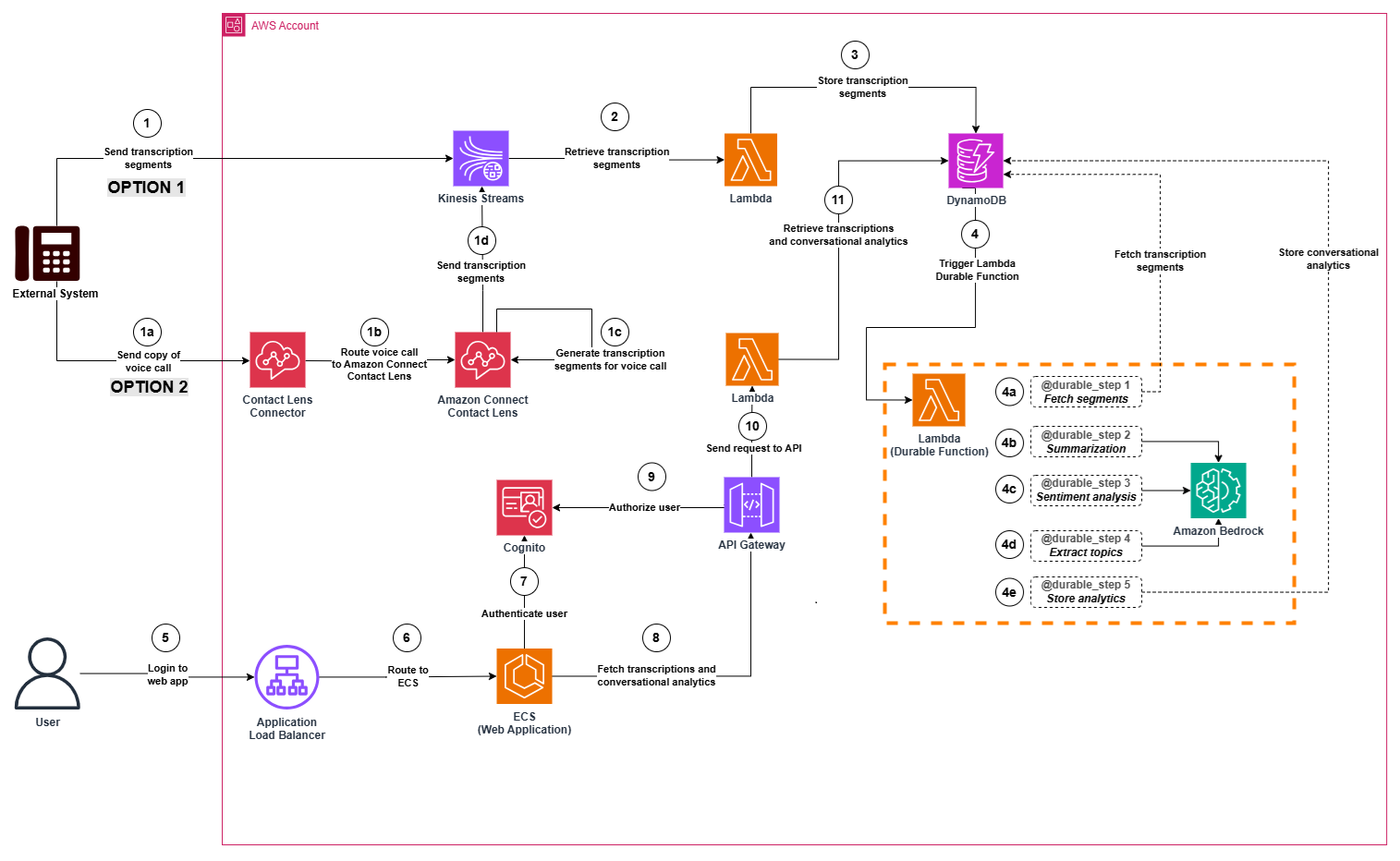
Step 1 (Option 1): Transcription segments are sent by an external system. The segments are stored in a stream (Amazon Kinesis Streams).
Step 1 (Option 2): Voice calls are sent by an external system to the Contact Lens Connector in AWS. The voice calls are then transcribed using Amazon Connect Contact Lens, to generate transcriptions and send these transcriptions to the stream.
- Step 1a: The external system sends a copy of the voice call to a Contact Lens Connector.
- Step 1b: The Contact Lens Connector routes the voice call to Amazon Connect Contact Lens.
- Step 1c: Amazon Connect Contact Lens generates transcriptions from a voice call.
- Step 1d: The transcription segments are stored in a stream (Amazon Kinesis Streams).
Step 2: A transcription processor function (AWS Lambda function) consumes transcription segments from the stream.
Step 3: The transcription processor function (AWS Lambda function) stores transcription segments in a transcription table in Amazon DynamoDB.
Step 4: A durable function (AWS Lambda Durable function) is triggered when new transcription segments are stored in the transcription table (the trigger is implemented using Amazon DynamoDB Streams). It orchestrates the processing of transcriptions in 5 steps.
- Step 4a: The durable function fetches the segments received for a given transcription. If all the segments of voice call are available, the processing continues to Step 4b. Otherwise, the Lambda function is stopped (since the transcription is not complete yet).
- Step 4b: The durable function summarizes the voice transcription using Amazon Bedrock.
- Step 4c: The durable function generates sentiment analytics for the voice transcription using Amazon Bedrock.
- Step 4d: The durable function extracts key topics from the voice transcription using Amazon Bedrock.
- Step 4e: The durable function stores the conversational insights in an analytics table in Amazon DynamoDB.
Step 5 and 6: The user accesses the web application and authenticates.
Step 7: Amazon Cognito validates the authentication details.
Step 8: Once the user is logged in, the web application sends a request to an API (Amazon API Gateway) to fetch the voice transcriptions and conversational insights.
Step 9: The API calls a Lambda authorizer to confirm that the user is authorized to retrieve the voice transcriptions and conversational insights.
Step 10: The request is sent from the API to a retriever function (AWS Lambda function to retrieve transcriptions from the transcription table and conversational insights from the analytics table).
Step 11: The Lambda function retrieves transcriptions from the transcription table and conversational insights from the analytics table.
After Step 11, the user can now consult the transcriptions and conversational insights from the web application.
Prerequisites
- An AWS account.
- A Unix based device (or Windows device with WSL setup to run bash scripts) with access to your AWS account with the following tools/libraries installed:
- Node.js and npm installed.
- Python 3.12 installed.
- Docker (for front-end containerization).
- AWS Command Line Interface (AWS CLI) configured with appropriate permissions.
- CDK installed.
- Clone the GitHub repository:
git clone https://github.com/aws-samples/sample-sca-with-lambda-durable-and-bedrock.git
Set up network and backend infrastructure
In this section, we setup the networking and backend resources of the solution.
Navigate inside the repository and complete the following steps to create these resources:
- Install dependencies and build project:
npm install npm run build cdk bootstrap
- Create networking infrastructure resources (Amazon Virtual Private Cloud (Amazon VPC), subnets, IAM roles, security groups and VPC endpoints):
cdk deploy ScaNetworkStack
- Create backend resources (Amazon Kinesis Data Streams stream, Amazon DynamoDB tables, AWS Lambda functions, Amazon API Gateway, Amazon Cognito):
cdk deploy ScaBackendStack
Create the web application
In this section, we create the web application of the solution.
Complete the following steps to create the web application:
- Create an Amazon Elastic Container Registry (Amazon ECR) repository to host the container image of the web application:
- Build and deploy container image in the Amazon ECR repository:
chmod +x scripts/deploy-container.sh bash ./scripts/deploy-container.sh us-west-2
Note: Replace us-west-2 with your deployment region.
- Deploy the web application:
cdk deploy ScaWebAppStack
- Deploy CloudFront Access stack (optional). This stack adds public subnets, an internet gateway, and an Amazon CloudFront distribution.Important note: This stack allows access to the web application from a public endpoint using an Amazon CloudFront distribution. You can use this stack if you currently cannot access a web application behind a private ALB with an existing private connection (virtual private network (VPN), AWS Direct Connect, etc.).
cdk deploy ScaCloudFrontAccessStack -c enableCloudFrontAccess=true
The web application is now available for testing.
If your web application is private, the application is deployed behind a private ALB. Access it from within the VPC using the ALB DNS name:
If your web application is public, the application is deployed behind an Amazon CloudFront distribution. You can access it using the CloudFront distribution URL:
Configure the Amazon Cognito user pool
In this section, we create a user in our Amazon Cognito user pool. This user will log in to our web application.
Run the script setup-test-user.sh to create the user (make sure to provide your email address):
Note: Replace [email protected] with your email address.
After you create the user, you should receive an email with a temporary password in this format: “Your username is #your-email-address# and temporary password is #temporary-password#.”
Keep note of these login details (email address and temporary password) to use later when testing the web application.
Test the solution
In this section, we test the solution by ingesting a transcription in the stream (Amazon Kinesis Data Streams) and visualize the results in the web application.
- Run the script ingest-transcriptions.sh to ingest a sample transcription in the stream:
chmod +x scripts/ingest-transcriptions.sh ./scripts/ingest-transcriptions.sh
- Open the URL of the web application in your web browser (either CloudFront distribution URL or ALB DNS name as mentioned in previous section).
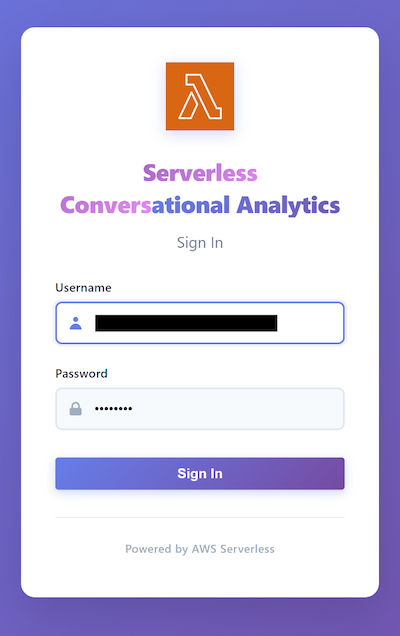
- Enter your login information (your email and the temporary password you received earlier while configuring the user pool in Amazon Cognito) and choose Sign in.
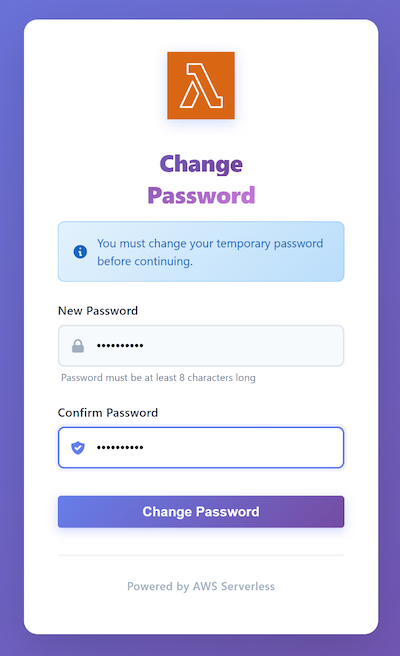
- When prompted, enter a new password and choose Change Password.
- You should now be able to see a web interface with a transcription as illustrated in the following screenshot:
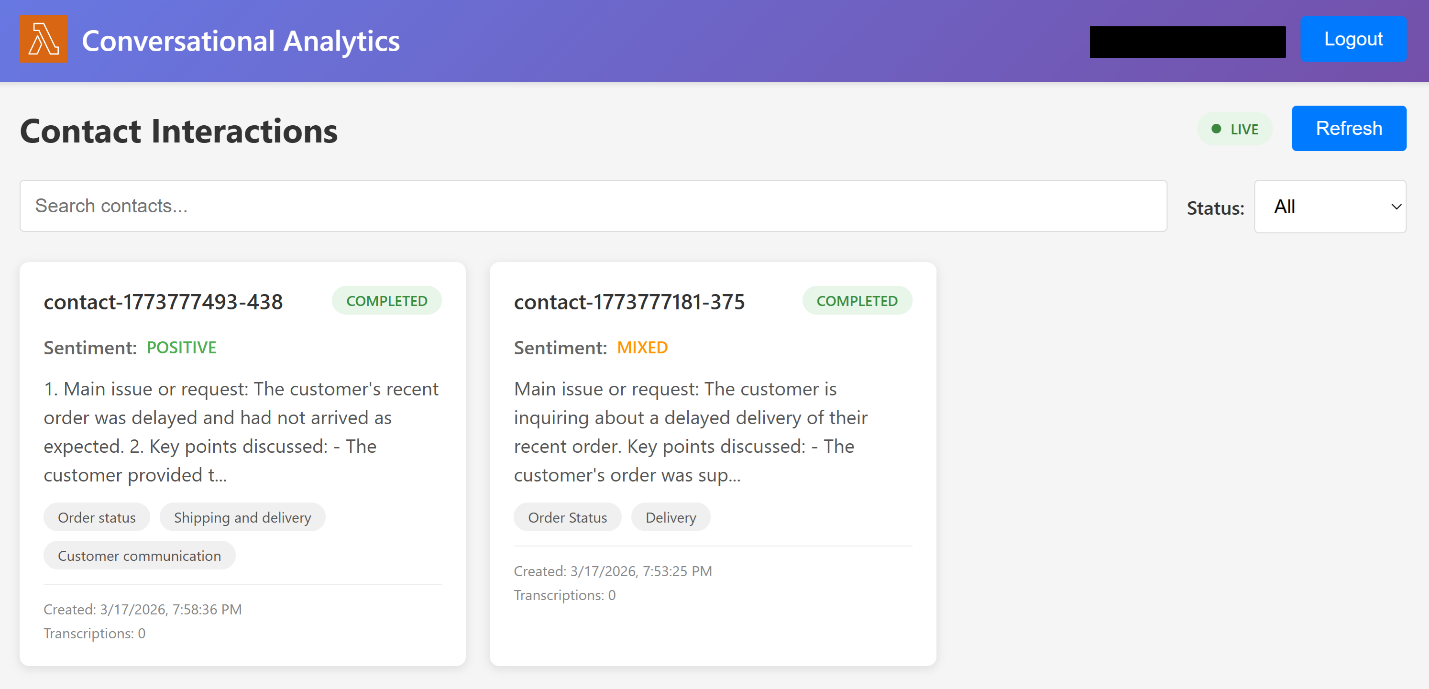
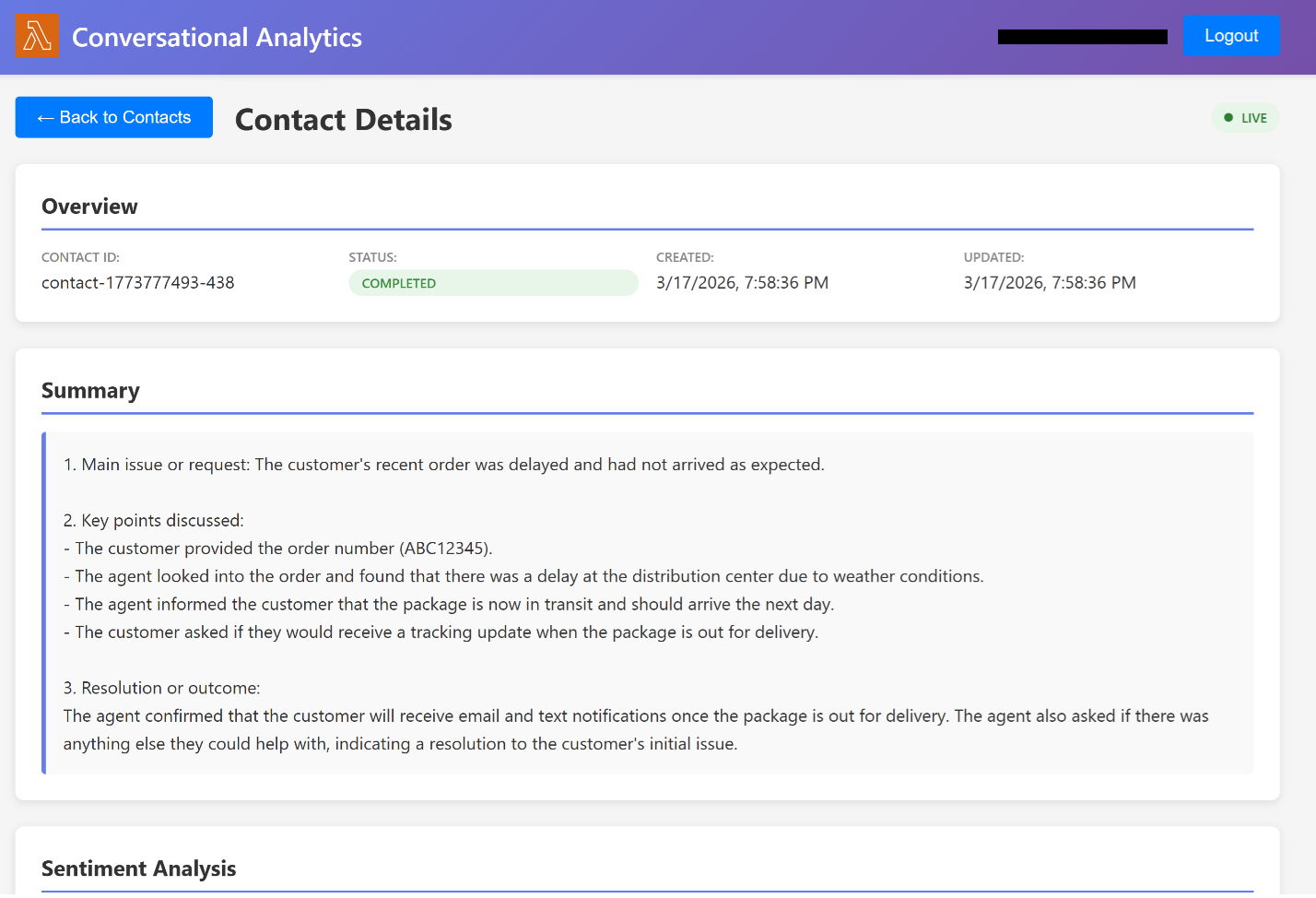
- Select a transcription to visualize the conversational insights as shown in the following screenshot.
If you want to explore an alternative option by placing a voice call using Amazon Connect (with Amazon Connect Contact Lens to generate the transcriptions):
- Create an Amazon Connect instance following instructions in the GitHub repository (Step 8 of the Deployment section).
- Place a phone call following the steps in the Place a phone call section.
Clean up
To make sure that no additional cost is incurred, remove the resources provisioned in your account. Make sure you’re in the correct AWS account before deleting the resources.
Important note: You should exercise caution when performing the preceding steps. Make sure you are deleting the resources in the correct AWS account.
You can navigate to the AWS CloudFormation console to delete the CloudFormation stacks associated to the resources provisioned.
You can also destroy the stacks using cdk destroy in reverse dependency order:
- If you deployed the optional CloudFront access stack:
cdk destroy ScaCloudFrontAccessStack -c enableCloudFrontAccess=true
- If you deployed the optional Connect integration stack:
cdk destroy ScaConnectStack -c enableConnect=true
- To destroy the core stacks:
cdk destroy ScaWebAppStack cdk destroy ScaEcrStack cdk destroy ScaBackendStack cdk destroy ScaNetworkStack
Conclusion
In this post, we walked through a solution to create a web application to visualize voice transcriptions and related conversational insights. First, we created network and backend resources. Then we created the web application. We also configured a user pool to grant a user access to the web application. Finally, we tested solution by ingesting transcriptions then visualize them in the web application.
For further information, consult the documentation of the following services: Amazon Bedrock, AWS Lambda durable functions, Amazon ECS, Amazon API Gateway, AWS Lambda, Amazon Kinesis Streams, Amazon DynamoDB and Amazon Cognito.
To dive deeper into this solution, a GitHub repository is available at this location.